
Every shift under control — even the ones you don't see
Tasks, staff clock-ins and fridge temperatures, live on one screen and on every phone your team already carries. In the language each of them speaks.
No card required · Android, Mac and any web browser
- Built in the EUMade and run in Vilnius, Lithuania
- Your data, under GDPRHandled by EU privacy rules
- 20+ languagesEach person works in their own
- No new hardwareRuns on the phones you already have
Why it's hard today
The inspector never calls ahead. Neither does a no-show.
In a restaurant or a hotel, the records have to be right on a day nobody planned for — and the team has to hold together on the nights you're not there. Three things make that hard, and none of them are about effort.
The logbook has gaps
Paper temperature and cleaning logs get filled in from memory at the end of a shift — or not at all. You find the missing rows when someone else is reading them.
With Loopapa: every check is a task on the right phone, saved with the time and a name.
You explain it three times
Hospitality teams rarely share one first language. Instructions given out loud get half-understood, and the same mistake comes back next week.
With Loopapa: tasks reach each person in the language they read best, and chat translates on demand.
You can't be on every shift
Who clocked in, what actually got done, whether the fridge check happened — it lives in your head, in a group chat, or nowhere.
With Loopapa: one screen shows who's on shift, what's done and what's still open.
A day with Loopapa
From first coffee to last lock-up, nothing depends on memory
This is an ordinary day when the routine runs itself — in the kitchen, at the front desk and on the hotel floor. Nobody hands out lists. Nobody chases paper.
Today · Morning shift
Harbour View Hotel
- Kitchen opening checklistKitchen · 06:30
- Fridge temperatures · 6 unitsKitchen · 11:00
- Room 214 · replace kettleHousekeeping · anyone free
- Breakfast room resetFront of house · 10:45
-
06:30Kitchen
The opening checklist is already waiting
Routines you set up once appear on their own — on the right day, on the right person's phone. Nobody has to remember to hand them out. How repeating tasks work
-
06:58Front desk
Anna clocks in from her phone — you get a ping
Presence alerts tell you the moment each shift starts. A no-show is something you notice at 07:05, not at noon.
-
11:40KitchenCritical
A freezer drifts out of range
The reading is flagged as critical the second it's saved, and the manager is notified — while there's still time to move the stock.
-
13:15Housekeeping
"Room 214 needs a new kettle" — said, not typed
The front desk speaks the task into the phone. It writes itself out with a title, priority and deadline, and goes to whoever in housekeeping is free first. Tasks from your voice
-
17:30Bar
A new starter checks the Handbook, not you
How to set up the bar, how to reset the breakfast room — written down once and found in seconds, in the middle of a busy shift.
-
23:30You
The shift writes its own report
When the last person clocks out, the report is already in your inbox: who worked, when, for how long, and every pause. The temperature log is complete for anyone who asks to see it.
Every fridge check, recorded the moment it happens
Set up your equipment once with its safe temperature range. From then on the check appears as a task on the right person's phone, and every reading is saved with the time, the temperature and the name of whoever recorded it.
Or let a wireless sensor fill it in for you
Place a small wireless sensor inside the fridge and the temperature records itself. No probe to hold, no number to type, no gateway to install — the phones your staff already carry collect the readings.
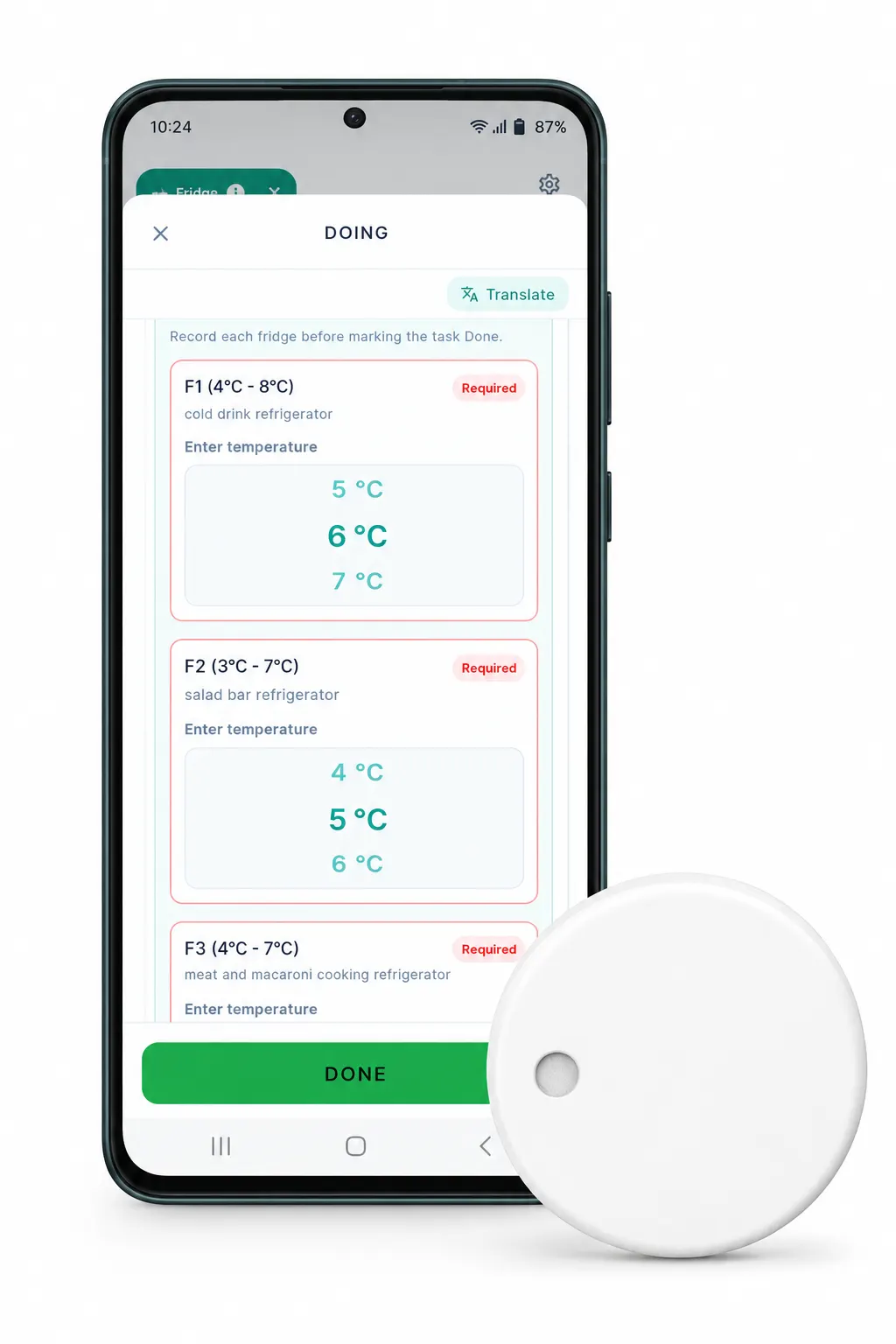
The hardware we recommend
We work with sensors from Ruuvi, a Finnish maker of rugged wireless sensors built for cold, damp, demanding places.
- Sealed and waterproof — survives washdowns and condensation
- Built to keep reporting at freezer temperatures
- Replaceable coin cell — swap it yourself in seconds
- Bought once, owned outright — no subscription on the hardware
A sensor records a number. Loopapa turns it into proof.
The hardware handles the measurement. Everything an inspector actually asks for happens on our side.
Reports on your letterhead
A clean PDF with your venue's name and logo, and space for a signature — ready to hand over, not a screenshot of an app.
In the inspector's language
Your team records in the language they think in. The report comes out in the language your local authority reads.
Signed by a person, not a device
Every reading carries a name and a timestamp, so the record shows who was responsible for each check.
Out of range? You know straight away
A reading outside the safe range is flagged as critical the second it's saved, and the manager is notified.
Cleaning checks, your way
Not every check is a number. Set up the cleaning checklist that fits your kitchen, and staff tick each item off inside the task as they go.
One task, every fridge
Six units to check? They collapse into a single task card, and it only closes once every unit has a reading saved.
Know who's on shift without asking
Staff clock in from their own phone. You see the shift open in real time, and when it ends the hours are already written down — no timesheet to chase, no memory to trust.
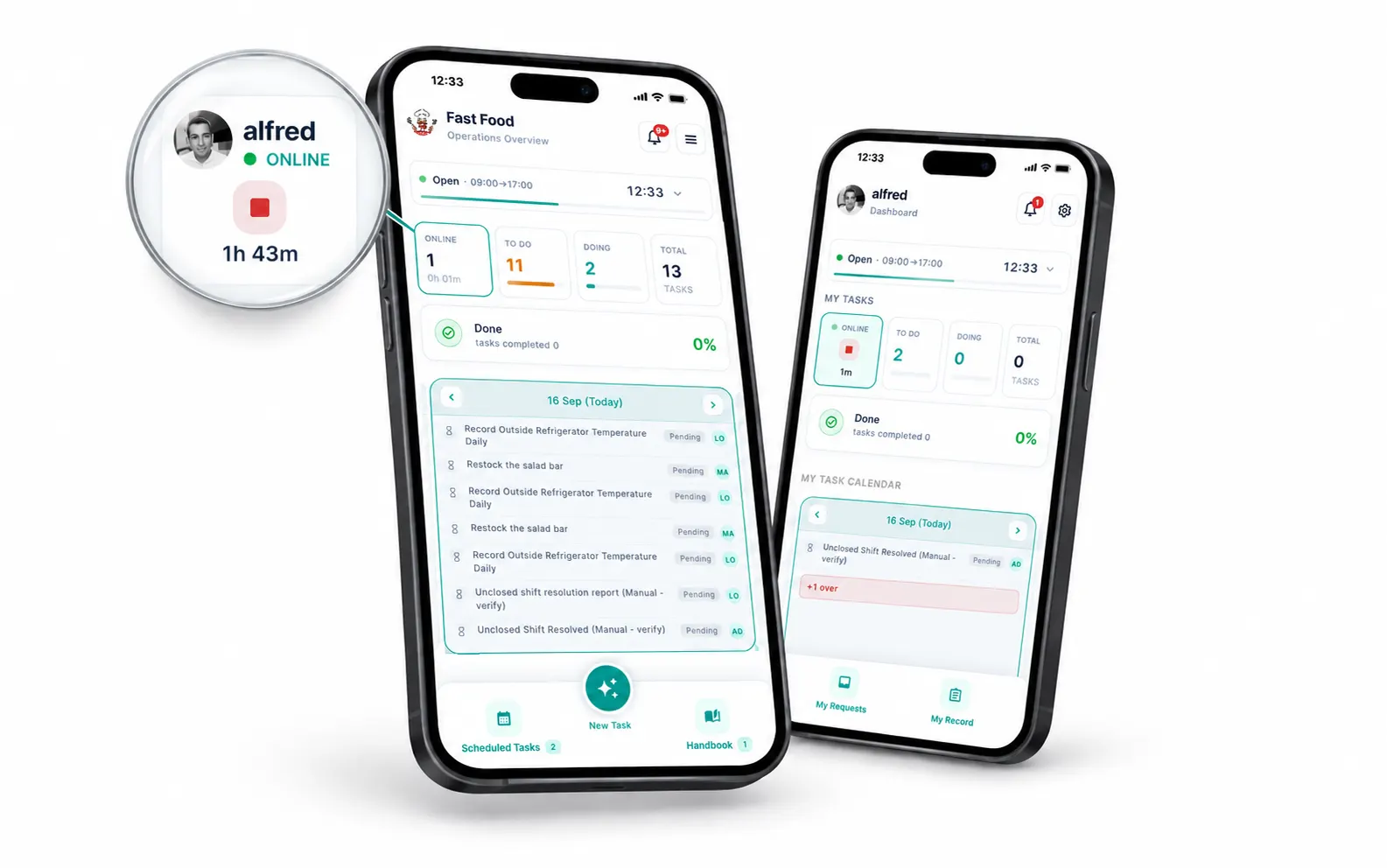
One screen, the whole floor
Your dashboard counts who is online right now. Staff get the same view of their own shift — a running timer and a stop button, nothing to learn.
- Their phone, not a shared terminal. Nothing to install at the door, nothing to buy, nothing that breaks on a busy Friday.
- Breaks without paperwork. Staff pause and resume their own shift whenever they need to — no request, no approval, no waiting on you.
- Work follows the shift. Tasks only open once someone is actually clocked in, so a job can't be ticked off by someone who isn't there.
A ping when they arrive, a ping when they leave
Turn on team presence alerts and your phone tells you the moment someone starts their shift, and again when they finish — so a no-show is something you find out at 09:05, not at noon.
The alerts don't vanish once you've read them. Your notification history keeps the record of who arrived and who left, and when — easy to scroll back through weeks later when someone disputes a shift. About notifications
Every shift writes its own report
The moment a shift ends, a report lands in your inbox automatically: the date, who worked, start and finish times, total hours, and every pause with its exact time and length.
Staff see their own version too — hours this month, a seven-day chart, day by day. Payroll questions answer themselves.
From a screen to a signed sheet
Staff watch their hours build up on their phone. You print the same hours as a clean report on your own letterhead — with your logo and a signature line — for payroll, an accountant, or a labour inspection.
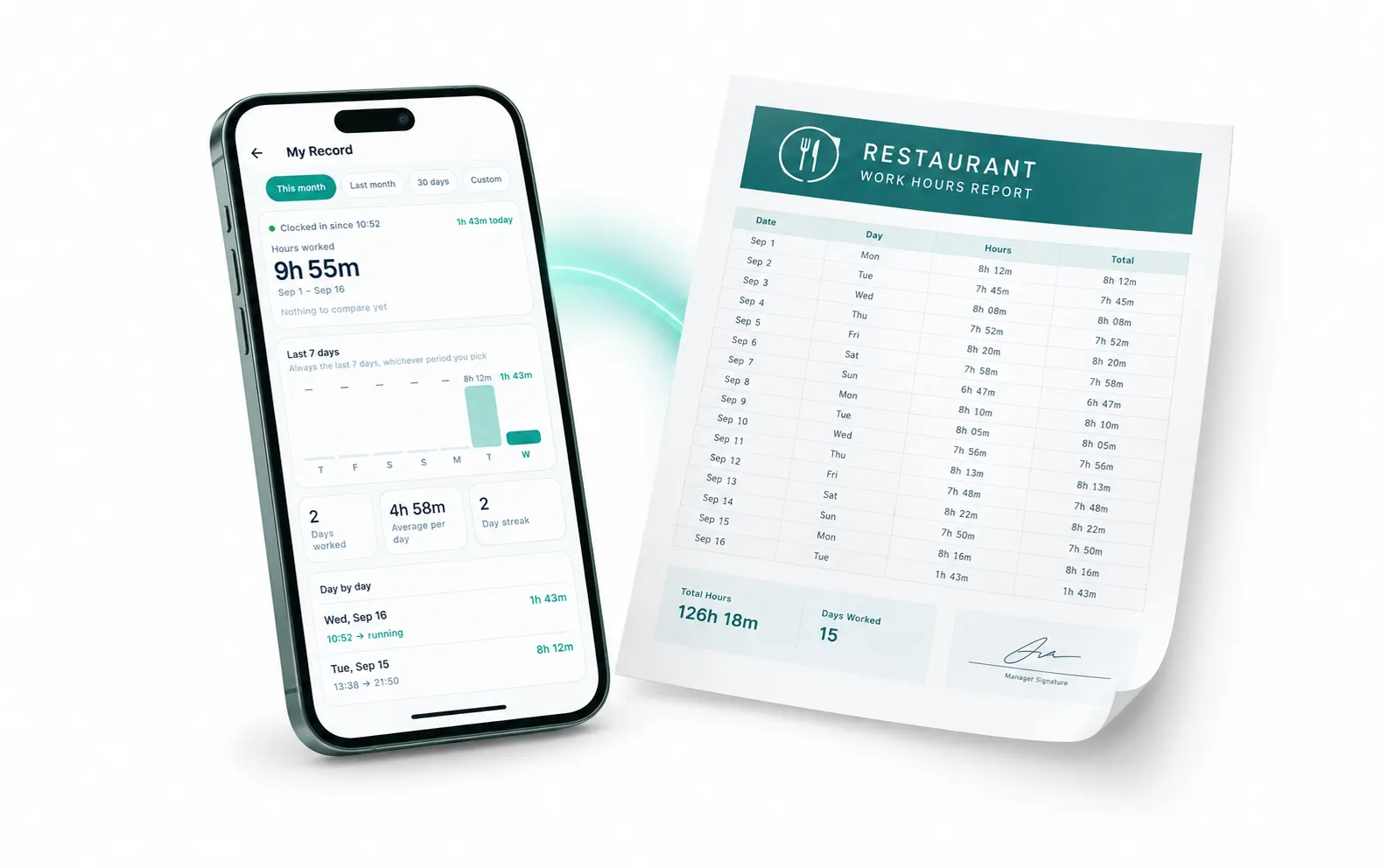
One app, the whole venue
Built for every corner of a hospitality business
Kitchen, bar, front desk, housekeeping — each team gets its own routines, and you see all of them in one place. A few of the routines you can set up on day one.
Kitchen
- Opening and closing checks
- Fridge and freezer temperatures
- Cleaning schedules
- Delivery checks
Bar and floor
- Bar setup and close-down
- Table and terrace checks
- Stock counts
- Glass-washer cleaning
Front desk
- Check-in preparation
- Guest requests turned into tasks
- Handover between shifts
- Problems reported from reception
Housekeeping and maintenance
- Room readiness checks
- Minibar restocking
- Repairs spotted on the floor
- Linen and laundry rounds
Running more than one venue?
Run every branch from one account — each with its own team, its own manager and its own data.
And the rest of the day runs on it too
Compliance is the part that gets inspected. These are the parts that keep a shift from falling apart.
Assign work the way you actually work
Give a job to one person, to whoever is free first, or to the whole team at once — each with their own copy to tick off.
See the whole week at a glance
What's done, what's due today and what's coming up — on one calendar strip, for you and for every person on the team.
Procedures written down once
Talk through a procedure, photograph a checklist or upload a file, and it becomes a clear written guide in your Handbook.
Questions stay on the job
Every task carries its own chat thread, translated on demand into each person's language. Nothing lost in a group message at midnight.
Reports straight from the floor
A broken freezer, a delivery short by two crates — staff record it in seconds, by voice or text, and it lands with you for review.
Every employee on one screen
Add seasonal staff quickly, keep each person's details and documents in one place, and switch off their access when the season ends.
Frequently asked questions
What restaurant owners and hotel managers usually ask before they start.
Does Loopapa make my restaurant HACCP compliant?
Is it only for restaurants, or does it work for hotels too?
Do I need to buy any hardware?
My team speaks different languages. Will that work?
How much does it cost to get started?
Who is behind Loopapa, and where does my data go?
Tonight's shift could already run on Loopapa
Set up your first checklist, invite your team, and let them join from their own phones. You'll see the first clock-in and the first completed check on your screen the same day.
No card required · We reply to every message within one business day
Loopapa is made by Hometection Technologies MB · Vilnius, Lithuania, EU